What Is a Vector File Format?
If you’ve ever hired a designer to create a logo, you’ve probably heard the phrase “vector file.” But what exactly does it mean?
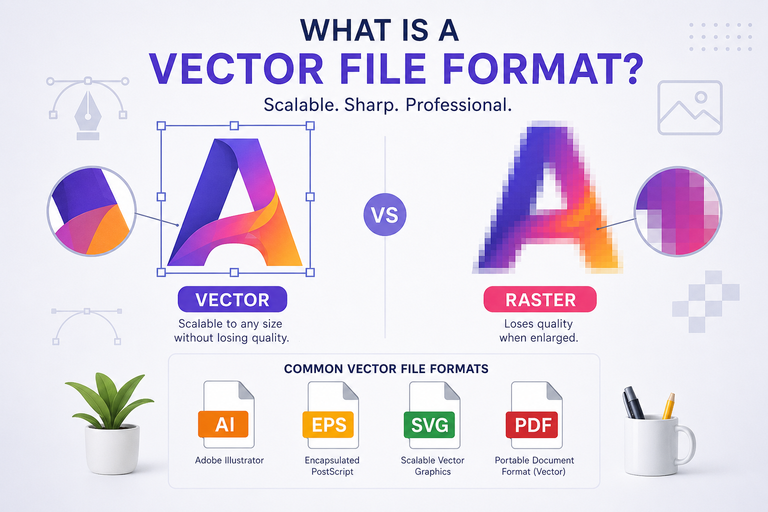
A vector file format stores graphics using mathematical paths instead of pixels. This allows the artwork to be resized to virtually any size without losing quality.
Whether your logo appears on a business card or a billboard, a vector graphic remains sharp and professional.
How Is a Vector Different from a Raster Image?
The biggest difference between vector graphics and raster images is how they are created.
| Vector Graphics | Raster Images |
|---|---|
| Made from mathematical paths | Made from pixels |
| Can be scaled without losing quality | Lose quality when enlarged |
| Ideal for logos and illustrations | Ideal for photographs |
| Small file sizes for simple artwork | Larger file sizes depending on resolution |
Common raster file formats include:
- JPG
- JPEG
- PNG
- GIF
- BMP
Common vector file formats include:
- SVG
- Ai
- EPS
- PDF (when exported as a vector)
When Should You Use a Vector File?
A vector format is the best choice whenever artwork needs to be resized or printed professionally.
Common uses include:
- Company logos
- Brand identity
- Business cards
- Flyers and brochures
- Packaging
- Billboards
- Vehicle wraps
- Promotional products
- Apparel printing
- Signs and banners
Because vectors are resolution-independent, they ensure consistent quality across all applications.
Why Are Vector Files Important?
Using a vector file offers several advantages:
- Unlimited scaling without quality loss
- Crisp, sharp lines at any size
- Easy color editing
- Smaller file sizes for simple graphics
- Professional printing compatibility
- Long-term usability for branding
For businesses, a vector logo is considered the master version of the brand identity.
Most Common Vector File Formats
SVG (.svg)
Ideal for websites and digital graphics. SVG files are lightweight, scalable, and supported by modern web browsers.
AI (.ai)
The native format of Adobe Illustrator. Designers use AI files for creating and editing vector artwork.
EPS (.eps)
A widely accepted format for commercial printing and logo sharing between designers and print providers.
PDF (.pdf)
Not every PDF is a vector file, but PDFs exported from vector design software often preserve vector data and are commonly used for printing.
Can You Convert a JPG or PNG into a Vector?
Yes—but with limitations.
Simple graphics such as logos, icons, and illustrations can often be converted into vector artwork using vector tracing.
However, photographs cannot be perfectly converted into vectors because they contain thousands or millions of pixels and color variations.
For the best results, logos should be created as vectors from the beginning.
Why Every Business Should Keep a Vector Logo
Many businesses only receive a PNG or JPG version of their logo. While these files work for websites and social media, they may not be suitable for professional printing or large-format graphics.
Keeping the original vector logo ensures that your brand can be used consistently across digital and print materials without sacrificing quality.
A vector file format is one of the most valuable assets for any business. It allows logos and graphics to remain sharp at any size, supports professional printing, and makes future design updates much easier.
If you’re building a new brand or updating your existing identity, always request the original vector files from your designer.
Need a professional vector logo or artwork? At Andora Solutions, we create high-quality vector graphics in Ai, EPS, SVG, and PDF formats, ensuring your brand looks sharp across digital platforms, print materials, signage, and large-scale advertising.